
Plans are not set in stone. You can change them, copy them, take them off the storefront or remove them, and the four actions differ mostly in what happens to existing subscriptions.
Edit a plan
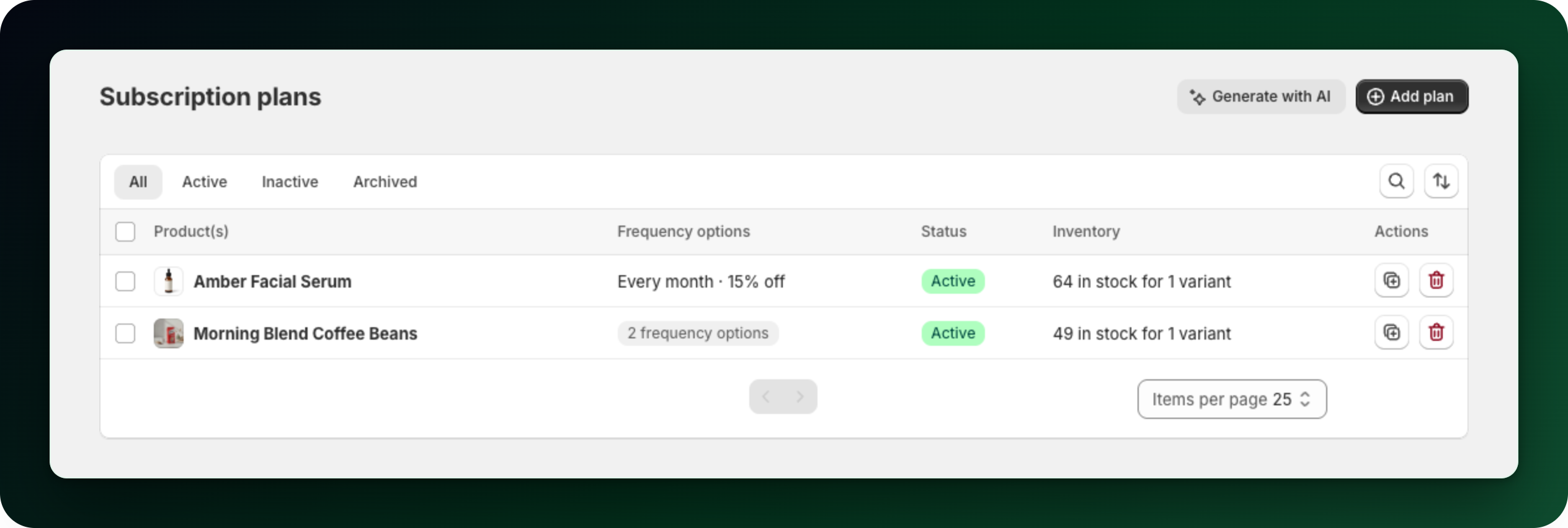
Go to Plans and click the row. Change the products, the delivery options, the discounts, then Save. To find a plan, click the search icon above the table. It matches plan name or product name, as its placeholder says.
Deactivate a plan
Open the plan and switch the status dropdown on the right from Active to Inactive, then save. Or tick plans in the list and use the Inactive bulk action. The confirmation is explicit: "This will hide the subscription plan from customers. Existing subscriptions won't be affected." Nobody new can subscribe, everybody already subscribed keeps renewing.
The Active bulk action puts them back on sale.
Duplicate a plan
Click Duplicate in the header of the plan page, or the duplicate icon in the plan row. The copy keeps the delivery options and the free shipping setting, is created Inactive, and starts with no products. Pick its products and save.
Delete a plan
Delete from the list: the delete icon in a row, or tick several plans and use the delete bulk action. That path checks the plan first. A plan with active, paused or failed contracts is archived instead of deleted, and the toast tells you so: "Subscription plan archived. It has active, paused, or failed contracts."
The Delete button in the plan page header does no such check. Its dialog claims "This can't be undone. Existing subscriptions on this plan are not affected.", but a plan with active subscribers is removed outright there. Delete from the list instead.
Archived plans
The table has four tabs: All, Active, Inactive and Archived. Archived plans are hidden from All and live on their own tab. Deleting from the Archived tab is final: "This will permanently delete the plan. This action cannot be undone."
What to do next
Changing prices? Deactivate the old plan and build a new one, so existing subscribers keep the deal they signed up for.
Check the Subscriptions list before deleting anything.
Stuck on any of this? Open the chat in the bottom right corner of the app and we will help you set it up.