
A renewal can fail because the card was declined or the bank refused the direct debit. The app then retries on the schedule you set, warns the customer, and finally applies the action you chose.
Step 1: Set the rules
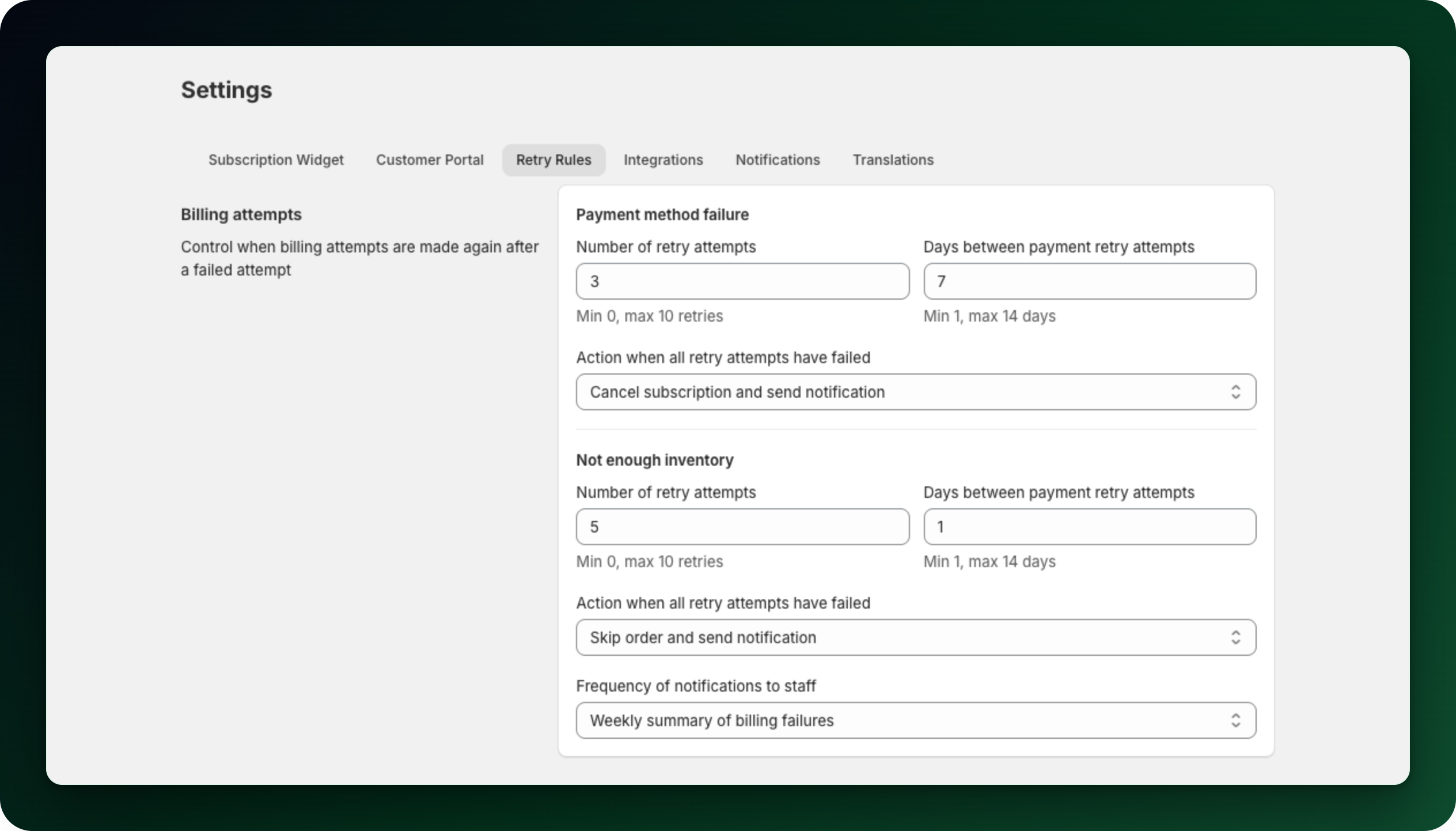
Go to Settings → Retry Rules. Under Payment method failure set Number of retry attempts (min 0, max 10) and Days between payment retry attempts (min 1, max 14). Then pick What to do when every retry has failed: Skip order and send notification, Pause subscription and send notification or Cancel subscription and send notification.
Step 2: Know which emails go out
Billing failed goes to the customer after a failed attempt that will be retried.
Billing failed (last attempt) goes to the customer before the final retry, with the date of that retry.
Subscription deactivated goes to the customer once the retries are exhausted and your chosen action is applied.
Payment failed (merchant) goes to your store contact email at that same moment.
You can rewrite all four under Settings → Notifications.
Step 3: Expect SEPA to behave differently
Mollie subscriptions use the same three settings, but the reason the bank gives decides how many retries run. Some refusals are final and are never retried: a wrong, closed or blocked account, or a deceased account holder. A problem with the mandate, or a debit the customer refused, gets at most 3 attempts, and never more than your own retry setting. Everything else, including insufficient funds, runs your full retry setting.
A chargeback emails you straight away, and a second chargeback on the same subscription triggers the final action immediately. If the cycle ends unpaid and its renewal order already exists, that order is tagged Mollie Payment Failed so you can find it.
Step 4: Check what actually happened
Open the subscription. A Mollie subscription lists every attempt under Past orders, with the state of each.
What to do next
On a Shopify contract, open the Payment method card on the subscription page and click Send link to update card.
Failures caused by stock are handled separately, see When there is not enough inventory.
Stuck on any of this? Open the chat in the bottom right corner of the app and we will help you set it up.