
If your store sells in more than one language, three things carry text a buyer reads: the widget on the product page, the plan names, and the subscription emails. They are handled differently, so it is worth knowing which is which.
Step 1: Add the language in Shopify first
A language must exist in your store before the app can translate into it. Add and publish it under Settings → Languages in the Shopify admin. The Manage store languages button in the app takes you straight there.
Step 2: Open the translations panel
Go to Settings → Translations, or the Translations tab on the Subscription Widget page. Both show the same card. Every language the app supports is listed already, so there is nothing to activate.
Step 3: Override the widget text
In Widget text translations, pick a Language and edit six fields: One-time purchase label, "Subscribe and save" label, Subscription note, Savings badge (percent), Add-on badge text and Add-on disclaimer text. Then use the save bar at the top of the page.
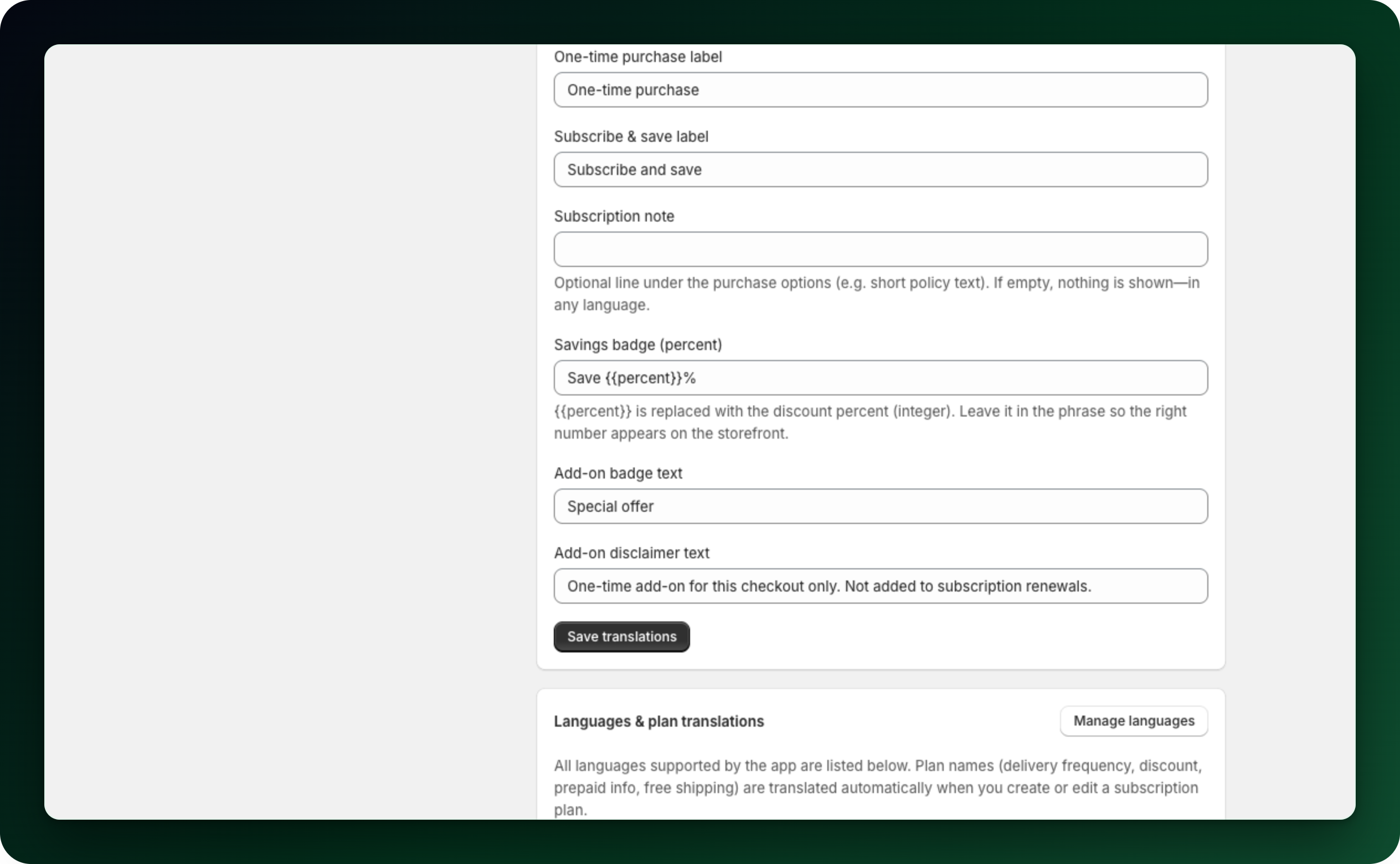
Your store default language sets the base wording; other languages only override it, and each field shows the default underneath. Keep {{percent}} inside the savings badge, otherwise no number appears. An empty subscription note hides that line in every language.
Step 4: Reword the customer portal
The Customer portal card on the same tab lets you rewrite the wording customers read in their account, per language, in your own words. "Reword the customer account portal" walks through it.
Step 5: Leave the plan names alone
A note under the language picker above is informational. Generated plan names, delivery frequency, discount, prepaid information and free shipping wording are translated automatically into every other language of your store that the app supports, whenever you create or edit a plan.
A name you type yourself is the exception. Tick Use a custom plan name on a delivery option and that Plan name is registered for every language on purpose, so it stays as you wrote it. Leave the generated name if you need the plan translated.
Which languages ship
Twenty-one: Czech, Danish, German, English, Spanish, Finnish, French, Italian, Japanese, Korean, Norwegian Bokmal, Dutch, Polish, both Portuguese variants, Swedish, Thai, Turkish, Vietnamese and both Chinese ones. The panel lists only the languages your store has published, plus the default. A language of your store outside that list of twenty-one is skipped, and one you have not published in Shopify does not appear at all.
Which language a customer sees
The storefront widget follows the language Shopify serves the customer, through Markets or your store locale. It does not guess from the browser. The subscription page in the customer account is translated by Shopify in the same way.
Subscription Widget → Global Settings → Customer language also offers the browser language and the customer location, but the widget follows the language Shopify serves whichever you pick.
Emails follow the subscriber language
Subscription emails are translated. Your store default language is kept in the template. Every other language takes its subject and intro message from the wording you wrote for it, or from the translation that ships with the app when you have not, and every subscriber receives the version in their own language. If most of your buyers read one language, write the emails in it.
What to do next
Open a product page in a second language and check the widget labels.
Create or edit a plan after adding a language, so its name is translated.
Check the wording of your subscription emails in each language you sell in.
Stuck on any of this? Open the chat in the bottom right corner of the app and we will help you set it up.